Plex APK is more than a normal movie-streaming app. It combines free ad-supported movies and TV, live TV, streaming discovery, and access to your own personal media library through Plex Media Server.
Plex APK is a new Android application that allows you to access your stored data from your Android TV, computer, or other devices. In this post, we have shared all details about Plex APK, including the download process, how to install it, its features, and much more.
What Is Plex APK?
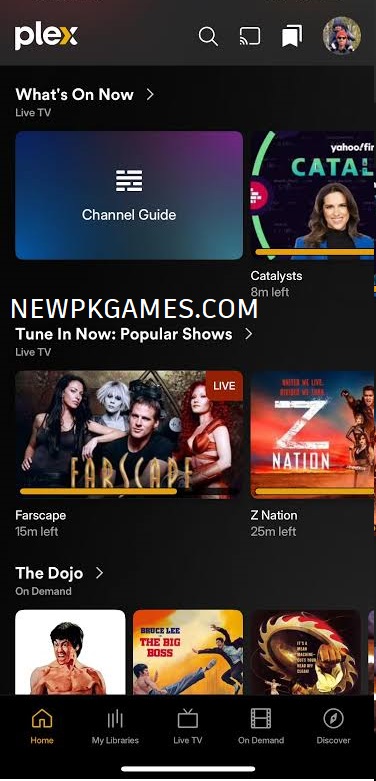
Plex is developed by Plex, Inc. and is designed to bring different types of entertainment into one platform. This application can be used to discover movies and TV shows, watch free ad-supported content, access Live TV, and connect to a personal Plex Media Server.
Why Are People Searching for Plex APK?
There are several reasons Android users search for the APK version. Some devices do not have the Google Play Store. This can happen with certain Android TV boxes, customized Android devices, or devices where Google services are unavailable.
What Can You Do With Plex?
Plex has two major sides.
The first is its own free entertainment service.
The second is its personal media-server system.
1. Watch free movies and TV shows
Plex offers free, ad-supported movies and television content. The exact selection can change by location and licensing arrangements. Plex says its free Movies & Shows service is available to users in almost every country.
2. Watch free Live TV
Plex also provides ad-supported Live TV. Its Live TV service does not require a TV tuner or antenna. You simply use a supported Plex application in an eligible region.
3. Stream your own media
This is where Plex becomes particularly different from ordinary streaming services. You can install Plex Media Server on a compatible computer or NAS, add your personal movies, TV shows, music, photos, and other supported media, and then access those libraries from Plex client applications.
Key Features of Plex APK
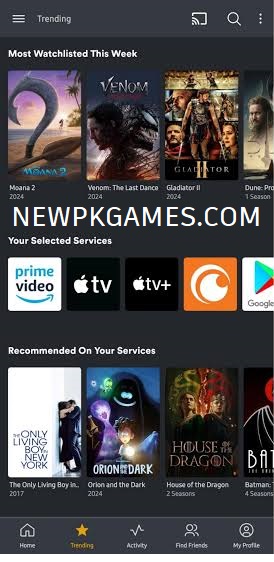
Universal Watchlist
Plex includes a Watchlist for keeping track of movies and TV shows you want to watch.
Discover Movies and TV Shows
Plex’s Discover feature helps users find movies and TV shows and see where they are available.
Free Streaming
Users can access a free streaming service through this application and enjoy free entertainment.
Live TV
The free Live TV service works on Android mobile, Android TV, Fire TV, Roku, Chromecast, Apple TV, Xbox, PlayStation, and other supported platforms.
Personal Media Streaming
With Plex Media Server, you can organize and stream your own compatible media across supported devices.
Watch Together
Plex supports Watch Together, allowing people to synchronize playback while watching supported content remotely. The feature supports Android mobile, Android TV, Fire TV, and several other Plex platforms.
Subtitles and Playback Settings
Plex provides various playback and subtitle controls. Android TV, for example, includes subtitle-size, color, and positioning settings along with advanced playback options.
Offline Downloads
Plex supports downloading eligible personal media from a Plex Media Server to supported mobile applications, but this is a premium feature requiring Plex Pass or qualifying Plex Home access. Plex’s free streaming catalog cannot be downloaded through this feature.
Plex APK vs Plex Media Server
These two terms are often confused.
Plex APK/App
- Used for watching/accessing media
- Installed on Android devices
- Acts as a player/client
- Useful on phones and TVs
- Can access Plex’s free streaming services
Plex Media Server
- Stores and manages your personal media
- Installed on a computer, NAS, or supported server device
- Acts as the media source
- Useful for managing your personal library
- Organizes your own media
You can use Plex’s own free Movies & Shows and Live TV services without setting up your own server. A personal server is needed when you want Plex to manage and stream your own media collection.
How to Install Plex APK on Android
- Go to the top of this page.
- Click on the download button
- Wait a momment and it will automatically download to your device/phone
- Go to your phone settings and enable unknown sources
- Double-tap on the downloaded file and wait a moment
- It will automatically install on your phone
Plex APK for Android TV and Fire TV
Plex is also useful on big screens.
Official Android TV and Google TV devices can run Plex through Google Play, while Amazon Fire TV devices have access through the Amazon Appstore.
This makes Plex suitable for:
- Android TV
- Google TV
- Fire TV
- Compatible smart TVs
- Chromecast
- Roku
- Game consoles
- Android phones and tablets
Plex APK Pros and Cons
Pros
- Free official Android application
- Free ad-supported movies and TV
- Free Live TV in supported regions
- Personal media server support
- Android TV compatibility
- Streaming discovery tools
- Watchlist functionality
- Watch Together support
- Works across many devices
- Optional Plex Pass for advanced features
Cons
- Free streaming contains advertisements
- Content availability varies by country
- Some advanced features require Plex Pass
- Personal media streaming requires server setup
- Performance depends partly on your server and network
- Unofficial modified APKs can create security risks
- Some older devices may not receive modern Plex features
Plex APK Use Cases
For Android phone users
Use Plex to discover entertainment, watch free content, access a personal media library, or control compatible Plex devices.
For Android TV owners
Plex can turn an Android TV device into a central entertainment interface for free streaming and personal media.
For families
A home Plex Media Server can provide access to a shared collection of family videos, photos, music, and movies on supported devices.
For media collectors
Plex can automatically organize supported personal media and add useful metadata, making a large collection easier to browse.
For travelers
Eligible personal media can be downloaded for offline viewing when the required Plex Pass conditions are met.
Tips for Getting Better Results With Plex APK
Keep your Plex app updated
Plex regularly releases updates for Android and TV platforms.
Use a stable network
Streaming from a home server depends heavily on network performance.
Check server hardware
If your server needs to transcode demanding video formats, its CPU and other hardware can affect playback.
Organize your media correctly
Good file organization helps Plex identify movies and TV shows accurately.
Avoid suspicious modified APKs
If a website promises “Plex Premium unlocked” or “everything free” through a modified APK, treat that as a warning sign rather than an advantage.
Final Thoughts
Plex APK is an Android application that can serve as a free entertainment app, a Live TV platform, a movie and TV discovery tool, and a client for your personal media server.
FAQs
1. What is Plex APK?
Plex APK is an Android app that allows you to enjoy your media Live TV and other chanels on your Android phone.
2. Is Plex APK free?
The Plex application can be installed for free, and Plex offers free ad-supported Movies & Shows and Live TV.
3. Can I use Plex without Plex Media Server?
Yes. You can use Plex’s free Movies & Shows, Live TV, and discovery features without running your own server. A Plex Media Server is required for streaming your personal media collection through the server-based Plex experience.
4. Can Plex APK work on Android TV?
Yes. Plex supports official Android TV and Google TV devices, and the application can be obtained through Google Play on supported devices.